After initiating a withdrawal on Cardnaira, you can clearly track every step of your funds' movement. This guide will show you how to quickly check your withdrawal progress and understand the different statuses.https://www.cardnaira.com/dashboard/wallet
How to Check Withdrawal Progress
-
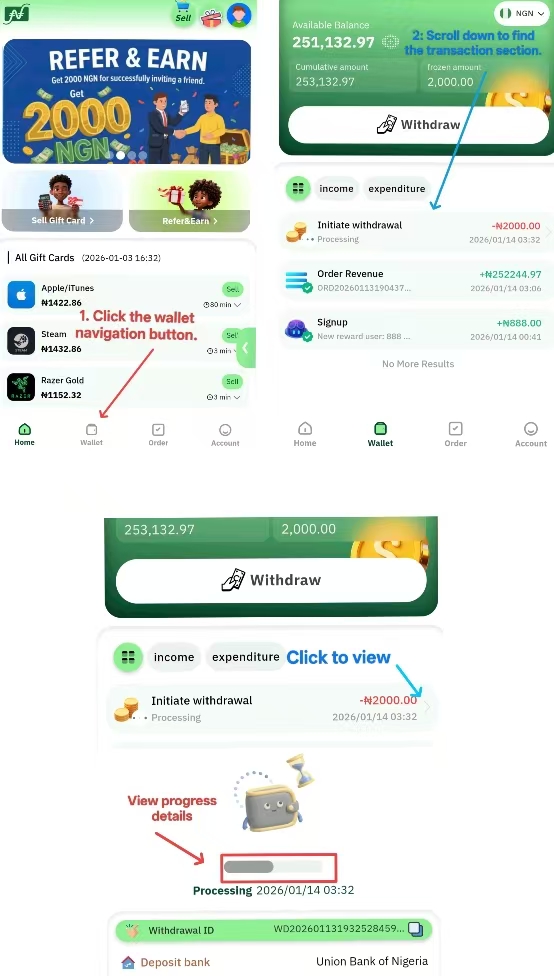
Log in to your Cardnaira account.
-
Click "Wallet" at the top of the page.
-
Scroll down to the "Transactions" section.
-
Find the withdrawal you want to check and click "View Details"
-
A pop-up window will appear, displaying the current progress. Each record will clearly show the following details:
Frequently Asked Questions
Q: Why is my withdrawal stuck on "Processing"?
A: This is the longest stage of the withdrawal process. Please wait patiently based on the estimated processing time for your VIP level. If the status hasn't updated in over 24 hours, first check your bank account to see if the funds have arrived, then contact our customer support for assistance.
Q: Why did my withdrawal status change to "Failed"?
A: This is usually due to incorrect bank card information or an issue with your bank account. After a failure, the funds are immediately and safely returned to your "Available Balance." You can click on the transaction to see the reason for the failure, correct the issue, and try again.
Q: I've received the money, but the status is still "Processing." What should I do?
A: Sometimes there is a delay in receiving confirmation from the bank. If you have confirmed the funds are in your account, there is no need to worry, even if the status hasn't updated. The system will typically sync and update to "Completed" shortly.